Changelog
Full release history for KUMA Timer — macOS & Windows professional countdown timer.
v1.20.1
Latest
13 Oct 2026
Fixed
- “Ignore TCR when loop” no longer hides the countdown of a second video that starts on the same PowerPoint slide, and a clip that was stopped or changed is never mistaken for a loop.
- KumaPoint 1.0.2 (separate download for PowerPoint): with several videos on one slide, such as a looping background under the VT, it follows the video that is playing, and looping clips are never reported, so a background loop cannot flash up as a countdown. Slide number, deck length and build counters are available in Companion as
ppt_slide_of(e.g.19/115) andppt_builds_of(module 2.6.2). - Bug fixes and stability improvements.
v1.20.0
13 Oct 2026
New
- Follow several TCR sources at once. QLab, Mitti, Millumin and PowerPoint can all run together: each keeps its own line, the clip that started last owns the main readout, and the Layout Editor gets a field per source plus an “Active TCR” field. Plus Ignore TCR when loop to hide the countdown of a looping clip.
- PowerPoint on up to four machines. KumaPoint can now listen to GFX 1, GFX 1 BACKUP, GFX 2 and GFX 2 BACKUP side by side — one TCR line per group, with the mirrored backup taking over the moment the primary goes quiet, and alerts when a backup is on air or the two drift apart.
- Ulanzi TC001 shows the video's time. While a clip plays its remaining time temporarily replaces the clock on the LED panel, with a small purple TCR tag. New firmware v3.40, and KUMA tells you with a blinking orange dot when a panel needs updating.
- Wide-screen kiosk. On an ultra-wide display (e.g. 2560×720) KUMA can run as a frameless full-height strip so another app can use the rest of the screen — left, centre or right, a fixed fraction or any width you drag.
- Auto-fit on short screens. The window now squeezes itself to fit 720 px-high screens and small laptops instead of cutting off the bottom.
- Bitfocus Companion module 2.6.0 (manual download until the registry catches up): per-source TCR lines, PowerPoint machine and backup status as variables, feedbacks and presets, and the module and host version as variables.
Fixed
- Settings no longer opens taller than a short screen, opens on the screen KUMA is on, and closes instantly even when an Ulanzi is offline.
- Windows: a log line with an arrow or dash could abort saving Settings.
- Bug fixes and stability improvements.
v1.19.3
7 Oct 2026
New
- KUMA Companion is now on Android. Free on Google Play as "KUMA Timer Companion" — Monitor, Controller and Stages views, QR pairing, local Wi-Fi or cloud relay, on phones and tablets (including Amazon Fire).
- Blackmagic output remembers itself. Once you go live it comes back on its own after a restart, and new setups default to 1080p25.
- Bitfocus Companion: TCR feedbacks and variables now work with every follow source (QLab, Mitti, Millumin, PowerPoint), plus Time Glide / Time Jump control, display mode and layout feedbacks, and live LTC / DSAN timecode variables.
- Volume licences can now stay offline for up to 90 days before needing a check-in.
Fixed
- On-screen messages now appear on NDI, OMT and Blackmagic outputs in Round and RounDOT styles too.
- The control window's preview no longer stays red when you switch to Time of Day after a countdown finishes.
- Companion apps no longer lose the cloud connection until a restart after a brief network hiccup, and the host reappears in the app's host list on its own after its IP address changes.
- Bug fixes and stability improvements.
v1.19.2
24 Sep 2026
New
- Blackmagic DeckLink SDI/HDMI output. Send KUMA's timer straight to a video switcher or router via a Blackmagic card — matches the main display exactly: progress bar, custom layouts, colours. Fill+key supported for compatible keyer hardware. Settings → Devices → Blackmagic (macOS & Windows, Full tier).
- Test Pattern mode for Blackmagic. Cover the whole output with a calibration pattern (SMPTE colour bars and more) to check geometry, colour and overscan on a new screen or video device — independent of the timer, hides again exactly where it left off.
- Bitfocus Companion: nudge the Time Glide/Jump "Cut" amount live with ±1 minute / ±1 second buttons, without cancelling the countdown. OMT, LTC Generator, Chase to Timecode and DSAN RX now have their own actions and feedbacks too.
Fixed
- The control window's own live preview could go invisible if you'd customised the timer text colour — it now always stays readable for you, independent of what colour the audience-facing output uses, in every mode (standby, running, overtime, clock).
- Ulanzi TC001 no longer ticks past 00:00 in "Stay at 00:00" overtime mode.
- Import/Export icons in Settings render correctly on Windows.
- Windows: fixed a licence check that could occasionally fail right after a cold boot, asking for your registration code again even though nothing had changed. Re-entering the same code always worked as a workaround; this is now fixed at the source.
- Bug fixes and stability improvements.
v1.19.0
14 Sep 2026
New
- OMT & NDI® video output now both work on Raspberry Pi. OMT (Open Media Transport, royalty-free) has always run on Pi; NDI® joins it.
- Chase to Timecode. KUMA can trigger cues automatically when incoming LTC reaches each one's target timecode — the broadcast convention where cue content starts at a fixed point. Optional OSC on cue start/end to notify lights, sound or another system.
- Design custom Looks entirely from the Pi web admin. A full drag-and-resize layout editor, no desktop needed — position the timer, cue name, progress bar and more on a canvas, save as a Look, recall it any time.
- LTC Generator. Generate outgoing LTC/SMPTE timecode audio for recorders, QLab, Resolume or a DAW, in addition to receiving it.
- DSAN Limitimer RX. KUMA can now receive a DSAN countdown signal (flywheel-smoothed) as well as transmit one.
- Free online timer. A quick countdown timer at kumatimer.app/timer — no install required. Log in with your KUMA licence for extra options.
- New home: kumatimer.app.
- Redesigned Import / Export. Live progress with a green checkmark per category — presets, cues, layouts, devices and more — as it transfers, instead of a silent all-or-nothing operation.
- LED dot-matrix host monitor readout. The control window's own preview box can now render the timer as a 5×7 LED dot-matrix over a dotted LCD panel, matching what your Ulanzi/ESP32-S3-BOX shows. On by default; switch back to classic smooth text in Settings → Display.
- Read the full write-up: What's New in KUMA Timer 1.19.0.
Fixed
- Background colour and timer font now reach KUMA Live, iOS Companion and the web mirror. Both were silently stuck on defaults on every surface except the main display.
- Static SMS messages are centered correctly; scrolling SMS messages appear instantly. Scrolling messages used to take a few seconds to become visible on the KUMA Live web viewer.
- TCP/UDP show control settings apply immediately. No more restart required after changing the port or toggling it on/off.
- Import no longer silently drops settings if the Settings dialog was left open in the background. It used to re-save stale values right over the freshly imported config.
- Bug fixes and stability improvements.
v1.18.6
27 Aug 2026
- Bug fixes and stability improvements.
v1.18.5
23 Jul 2026
- Fixes a v1.18.4 regression on Ulanzi: the overtime blink no longer bursts short-ON / long-OFF after a Wi-Fi hiccup.
v1.18.4
23 Jul 2026
- Wall-clock overlay applies live under custom layouts. Overtime keeps the digits centred. Ulanzi survives Wi-Fi hiccups and blinks evenly. QLab Test flags a bad passcode.
v1.18.3
21 Jul 2026
- QLab follow now works over TCP, not just UDP — a new Auto transport switches to it when QLab's UDP replies don't come back. Test connection follows suit.
v1.18.2
15 Jul 2026
- KumaPoint (Windows add-in) counts down a PowerPoint slide video like a QLab TCR. Followed clips no longer reset a running timer. Presenter View fixes.
v1.17.8
9 Jul 2026
- Layout Editor opens on the control screen when output is fullscreen elsewhere. QLab still-image cue no longer shows 00:00:00. macOS kiosk / Settings fix.
v1.17.6
7 Jul 2026
- Millumin (v5) joins QLab and Mitti as a TCR source. Mitti & Millumin gain per-output colours and cue-name styling on par with QLab.
v1.17.3
1 Jul 2026
- Broadcast-console redesign for the control window. Layout Editor gets an application menu bar. Import / Export Looks. Optional preset hold animation.
v1.16.7
29 Jun 2026
- Layout Editor Front / Back z-order works live. Licence emails on revoke or deregister. "Disabled" screen option lets you start with no display window.
v1.16.6
26 Jun 2026
- Per-surface layout overrides (NDI / KUMA Live / iOS separate Looks). Image / logo field in the Layout Editor. TCR positionable inside custom layouts.
v1.16.5
24 Jun 2026
- One-click kiosk / fullscreen toggle (F11 / Cmd+Ctrl+F). PAUSE / RESET colour tint. Time-of-Day on Ulanzi / S3 BOX via cloud. Layout Editor centred.
v1.16.3
18 Jun 2026
- Layout Editor: closing the display window with ✕ properly exits the editor. MM:SS timer centred correctly on Windows.
v1.16.2
17 Jun 2026
- Ulanzi no longer jumps after STOP + SET. OVERTIME renders as coloured text (no filled box) everywhere. Settings → Connections labels clarified.
v1.16.1
17 Jun 2026
- QLab / Mitti TCR chip is exclusive. Test connection waits for QLab's real reply. QLab TCR hides at Hold-at-End. The timer remembers its output screen.
v1.16.0
Feature release
16 Jun 2026
- Layout Editor (Full) — design your own clock window with drag-and-resize fields, save as presets. Mitti joins QLab as a TCR source. Sharper NDI layouts.
v1.15.2
9 Jun 2026
- Countdown / count-up now keep accurate time. A regression in v1.15.0–v1.15.1 could run the clock noticeably fast — install this if you had those.
v1.15.1
8 Jun 2026
- QLab TCR no longer flashes the full clip length at the end of a cue — it stays at zero and hands cleanly back to your own timer.
v1.15.0
8 Jun 2026
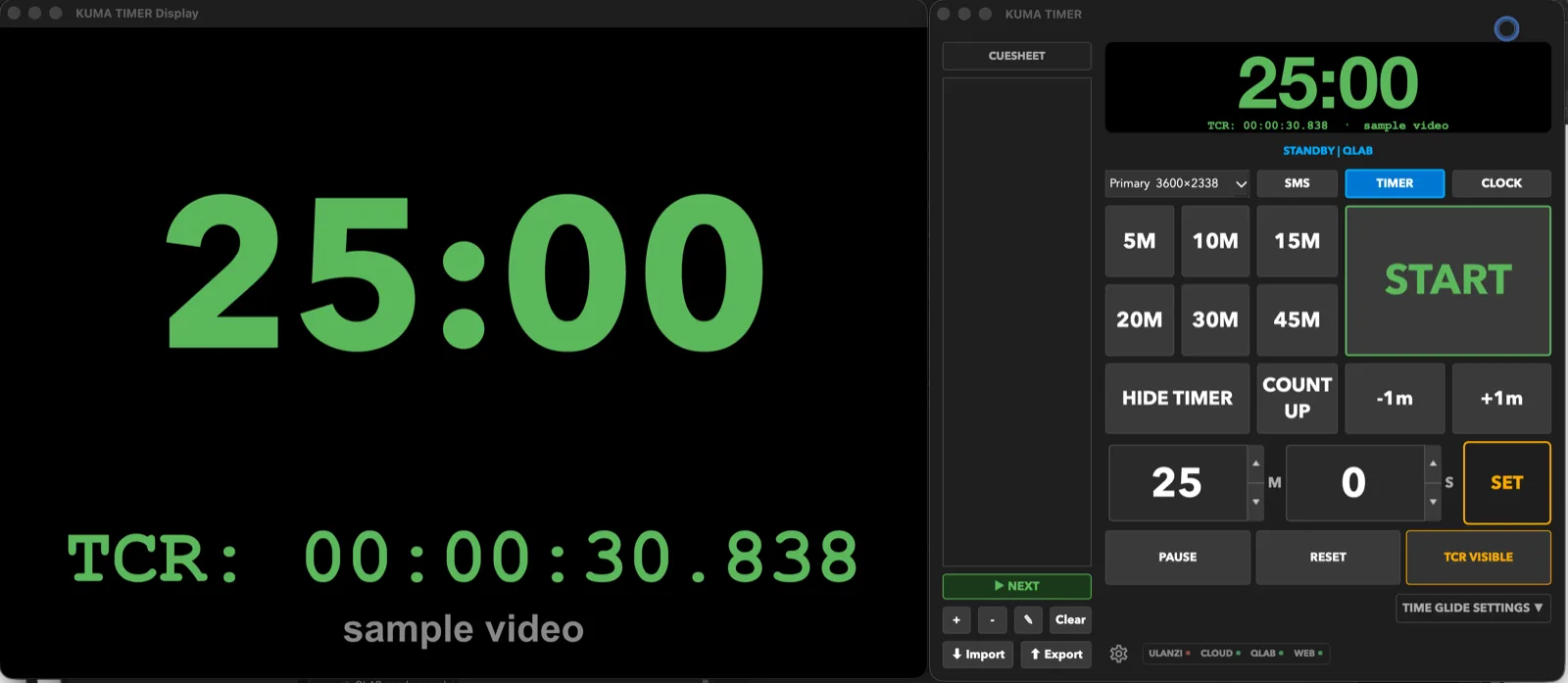
- QLab integration (Full): mirror QLab's TCR on host / NDI / KUMA Live / ESP32-S3-BOX, fire OSC triggers, and use QLAB HOLD to audition without spoiling.
v1.14.9
3 Jun 2026
- Windows: "Install and Relaunch" now actually completes. The app could stay locked in memory after quitting for an update, so the installer couldn't replace it and nothing came back — it now exits cleanly, installs, and reopens by itself. (Existing Windows users: install this version manually once — every update after that is in-app.)
- Windows: a failed update reopens your current version instead of leaving you with no running app.
- Ulanzi TC001 firmware v3.27 (reflash via the web flasher): HH:MM:SS now uses a tall, clean font when the progress bar is off (no more squashed digits), sharper 2/7/9 digits, and the device's native clock no longer leaks back after a power-cycle.
v1.14.8
3 Jun 2026
- Keep the countdown on wireless LED displays during a message. New "Mirror SMS to wireless displays" toggle (Settings → Connections) — turn it off and SMS goes only to the host / web / app while the Ulanzi or S3 BOX keeps showing the timer.
- Progress bar direction — fill left→right or right→left (Settings → Display → Bar Direction).
- Frame-accurate (FR) clock no longer pauses at each :00, and wireless LED time now matches the host in FR mode (was one second behind).
- Overtime blink now works on the LED for HH:MM:SS / FR formats (previously only MM:SS blinked past zero).
- Host display keeps the progress bar visible during a banner SMS.
- Ulanzi TC001 firmware update (reflash via the web flasher): orange warning zone fixed, double-click the left button for battery %, 180° rotation flips the whole display, and the progress bar stays on-screen while a message scrolls.
v1.14.7
2 Jun 2026
- Windows: the in-app updater now self-updates correctly instead of opening a browser download. (Install this version manually once — every update after that is in-app.)
v1.14.6
2 Jun 2026
- Wireless LED displays show clean time in frame-accurate modes. Ulanzi TC001 and ESP32-S3-BOX drop the frame digits (which don't fit the matrix) and show MM:SS / HH:MM:SS — on both Local and Cloud connections.
- Frame digits no longer glitch under heavy CPU load (e.g. KUMA on the same machine as Watchout or a media server). Count-up also animates frames smoothly now.
- LED Cloud link is always visible in Settings → Connections — copy the setup URL for first-time device pairing without switching modes first.
- Windows: LED connection mode (Local/Cloud) selection now renders correctly; Test and remove-screen buttons fixed.
- New "Hide tooltips" option (Settings → Display) for a cleaner panel.
- macOS: Avenir Next is now the default timer font (existing setups keep their chosen font).
v1.14.5
29 May 2026
- Bug fixes.
v1.14.4
29 May 2026
- Bug fixes.
v1.14.3
29 May 2026
- Bug fixes.
v1.14.2
29 May 2026
New
- Frame-accurate countdown now works in Round clock style. MM:SS:FR and HH:MM:SS:FR display inside the ring — the font auto-sizes to fit the extra digits. RounDOT (BBC pip / Wharton dot-matrix) remains frame-display-free by design.
Fixed
- Mac DMG is now notarized. v1.14.0 and v1.14.1 shipped unnotarized due to a missing keychain profile on the build machine — first launch required right-click → Open. v1.14.2 passes Apple notarization and opens without any Gatekeeper prompt.
v1.14.1
28 May 2026
Fixed
- In-app update no longer wedges when /Applications/KUMA Timer.app has read-only permissions. v1.14.0's updater quit the running app, then failed with
rm: Permission deniedand never relaunched anything. The relauncher now retries withchmod, and if that still fails, asks for your password once and finishes the swap with admin rights (same UX as a macOS App Store update). If the password prompt is cancelled, the old app re-launches so you're never left with a closed window.
Existing v1.14.0 users: the broken updater is baked into your running copy, so you'll need to install v1.14.1 manually this time — download the DMG below and drag it into Applications. Every future update will use the fixed relauncher.
v1.14.0
28 May 2026
New
- Frame-accurate countdown for video workflows. New
MM:SS:FRandHH:MM:SS:FRclock formats for Watchout / QLab / vMix integrations — frames count down through each second so the director sees a SMPTE-style timecode racing toward zero. Settings → Display → Clock Format → pick FR variant → choose your frame rate (23.976 / 24 / 25 / 29.97 / 30 / 50 / 60). Visible on the main display, NDI output, and Presenter View. More → - TCP / UDP show control. Drive KUMA from Watchout V6, QLab, or any ASCII-capable console on port 36702. Commands:
START,STOP,RESET,SET 5:30,SETRUN 10:00,ADD 60,SUB 30,PRESET 2,CUE NEXTand more. Enable in Settings → Connections. Full reference → - Round-zero timer fonts. Helvetica Neue, SF Pro Display, Avenir Next, Arial Rounded MT Bold, Segoe UI added to Settings → Display → Timer Font alongside the classic monospace list — perfectly oval zeros for the broadcast look. Default unchanged.
Fixed
- Single-seat licences re-activate cleanly after a HWID change. Customers who reinstalled, upgraded macOS, or moved to a fresh user account used to wedge at "already registered" until manual deregister. Single-seat purchases now use the same auto-eviction logic as volume licences. Existing customers migrated server-side, no action needed.
v1.13.9
21 May 2026
New
- Wireless secondary displays — two options. Pair KUMA with an ESP32-S3-BOX-3 (320×240 IPS LCD, ~$40) via one-click web flasher, or a Ulanzi TC001 pixel-matrix display (8×32 RGB LEDs, ~$50). Both mirror the countdown, zone colours, background colour, overtime blink, progress bar and SMS messages. Full Local (LAN/UDP) and Cloud (relay, different Wi-Fi) modes. Flash your device →
- Redesigned Settings dialog. Sidebar navigation replaces the old tab bar — 8 sections, keyboard shortcuts Ctrl/⌘+1–8, search bar. All toggles are now pill-style Enable buttons so the layout stays stable whether a feature is on or off.
- License key auto-formats as you type. Mixed case, spaces and missing dashes are fixed automatically on paste or entry.
Fixed
- Adjacent progress-bar offset on Windows fullscreen. The offset spinbox had no effect after v1.13.7's Win32 rework — fixed.
- Entering > 59 minutes in MM:SS mode. KUMA now prompts to switch to HH:MM:SS and converts automatically (e.g. 120 min → 2:00:00). Switching back leaves minutes as-is.
v1.13.8
14 May 2026
Fixed
- Bug fixes.
v1.13.7
13 May 2026
Fixed
- Windows: fullscreen on a secondary monitor now actually goes fullscreen. Earlier the window stayed at a smaller-than-screen size on external 4K monitors when paired with a 1× laptop screen — DPI scaling mismatch let the first paint land at the wrong size. Now sized edge-to-edge from the first frame.
- macOS: the system menu bar no longer shows through the timer display. When you push KUMA to a secondary monitor, the timer now paints OVER the menu bar instead of sitting beneath it.
v1.13.6
12 May 2026
Fixed
- NDI ROUND mode matches the host pixel-by-pixel. Font size, ring colour and the time-of-day arc all follow the host display 1:1. Previously NDI viewers saw a slightly oversized font, a stuck cyan ring (instead of the zone colour you set), and the analogue second-hand drawing on the wrong half of the dial every other minute.
- Time-of-Day ring no longer freezes as a full white circle. Affected the rare case where you'd configured separate Display styles for TIMER and CLOCK modes; the CLOCK view ignored its own style and forced a 100 %-filled ring. Now matches whatever you picked for CLOCK.
v1.13.5
11 May 2026
New
- Scan a QR to pair your iPhone / iPad. KUMA shows a QR; the Companion app reads it and connects in one tap. Two flavours: Pair this host (just this Mac/Pi) or Pair my fleet (one scan → live list of every host under your licence). Requires KUMA Companion 1.4 on iPad/iPhone.
- Configurable overtime blink. Choose 1 sec on / 1 sec off (default) or ½ sec / ½ sec. Blink edges now land on second boundaries instead of drifting at a half-second offset.
- Settings → Connections cleaner. One master toggle, password at the top, per-client sections (Browser pages / KUMA Companion / Stream Deck), advanced options tucked under their own header.
Bug fixes
- Audio cues reliable on Windows. Last-5-second ticks and time-up gong play on the second, every time.
- Time-of-Day inherits your bg colour on the analogue clock face (RoundDOT stays classic black by design).
- Smaller bugs: Settings dialog crash on open, CDEther status dot in Direct-Attach mode, IP addresses truncated in Connections, OVERTIME box left over after switching to Time-of-Day.
v1.13.4
10 May 2026
New
- Lower CPU on every platform. Running countdown with NDI active now uses roughly half the CPU of v1.13.0 on the same machine. New default NDI mode: 720p × 15 fps; switching to higher modes shows a CPU-cost notice so you can make an informed call.
- Time Glide — change duration / target time mid-glide. No more Cancel → edit → Apply round-trip. Edit the spinboxes while a glide is running and the engine re-targets automatically.
- macOS: steady blink and tick when KUMA is unfocused. Projector clocks no longer visibly slow down when you switch focus to PowerPoint, OBS or another app.
- Thomas-feedback batch. Progress bar offset works live and accepts 0 px. OVERTIME box auto-fits its text at large timer sizes. Time Cut strategy moved to a single Glide / Jump dropdown.
Bug fixes
- Squashed a handful of small bugs here and there — nothing show-stopping.
v1.13.0
8 May 2026
New
- Volume licence is now supported.
v1.12.1
8 May 2026
New
- OVERTIME box overlay — block label next to the digits when the timer crosses 00:00. Custom text, colours, size, position, distance.
- PVM transparent background with auto-refocus — the slideshow shows through, focus returns to PowerPoint / Keynote without an extra click.
- Keyboard-driven time entry — S jumps to the first time field, Tab cycles fields, Enter sets, Space starts.
- Adjacent progress-bar position — bar tucked directly below the digits.
Changed
- Timer size is now a signed % delta from auto-fit (-90…+500 %, 0 = auto).
Fixed
- Count Up → status sync, OVERTIME label across all overtime modes, OSC publishes
OVERTIMEas a distinct status. - Windows secondary-monitor fullscreen no longer leaves a 1-px desktop edge visible.
v1.12.0
7 May 2026
New
- Time Jump — stealth alternative to Time Glide. Hides countdown cuts as small skips landing on round boundaries; the last 3 minutes always tick at normal speed. Pick GLIDE or JUMP per show.
- MM:SS warning thresholds — Orange and Red colour transitions with second precision (e.g. Orange at 03:30, Red at 01:15).
- Per-zone colour overrides — configurable text + background colours for the orange and red warning zones.
- Overtime text colour override — counterpart to the existing background colour override.
- Manual font-size override for the timer (px), with 0 = auto-fit.
- Count-Up button toggle — second press returns to STANDBY.
Fixed
- Time-of-Day mode no longer pulses red when the underlying timer state is in overtime.
- CDEther LCD blinks in sync with the host display.
- Audio cues use threshold-cross detection so they never get skipped by a JUMP that bypasses the exact threshold value.
- iOS Companion Live Activity at 0:00 turns red immediately.
- v1.11 → v1.12 config migration so existing minute-only thresholds carry forward.
v1.11.8
7 May 2026
Fixed
- SMS sent via relay (iOS Companion / web admin) now appears in PVM mode.
- Background image presets are back in Settings → Display.
- PVM cursor no longer flashes to a resize-arrow as easily.
v1.11.7
7 May 2026
Fixed
- Presenter View Mode (PVM) crashed the app on enable — regression from the v1.11.3 timer-layout refactor.
v1.11.6
6 May 2026
Added
- Resume Direct-Attach prompt at startup if it was active in your previous session.
- Remaining trial days shown in the macOS title bar.
Fixed
- Direct-Attach UI cleanup — clear split between standard broadcast (router) and no-router mode.
- Orphan DHCP child adoption after KUMA restart; Disable now reliably stops it.
- Virtual interfaces (Tailscale, Docker, etc.) hidden from the interface picker.
- "Advanced IP settings" disclosure keeps the section clean for the 99% case.
v1.11.5
6 May 2026
Fixed
- Direct-Attach Mode on macOS — child PID detection.
v1.11.4
6 May 2026
Fixed
- Release notes in the in-app updater dialog were stale.
v1.11.3
6 May 2026
Added
- Direct-Attach DHCP Mode — connect a CDEther directly to your laptop without a router. Settings → Connections → CDEther → Direct-Attach Mode → Enable.
Fixed
- Start / Pause / Reset over Bitfocus Companion and web admin now work on Lite tier.
- CDEther broadcast simplified — matches the Interspace manual; resolves Windows broadcast issues introduced in v1.11.2.
- Removed misleading "Switch to Lite" / "Back to Trial" buttons. Trial now runs linearly from install.
- Windows: no more console flashes; faster startup.
v1.11.2
4 May 2026
Added
- Capability negotiation with iOS Companion — host now advertises a feature flag list in
/api/statusso the iPad app can gate its UI on what this host actually supports, instead of guessing from the version string. - In-app updater — macOS DMG and Windows EXE self-update with code-signature verification and silent relaunch.
- Audio cue routing — separate toggles for iOS / Web / NDI mirroring; iPad now plays cues from its own clock for tight cadence over cloud relay.
- NDI custom background image, RounDOT vertical breathing room, multi-hour cue display (H:MM:SS).
- Raspberry Pi AppImage back in the release matrix — NDI disabled by default while we wait on Vizrt licensing clarification, otherwise full feature parity with desktop.
Fixed
- Bonjour now advertises the primary-interface IP so the iPad finds the host even when the Mac has multiple network interfaces (VPN, Ethernet + Wi-Fi).
- iPad timer second cadence smoother under variable cloud-relay latency.
- SMS / HIDE TIMER / progress-bar parity across host, NDI, web viewer and iPad.
- Lite-tier gates: SMS API, remote control, audio cue companion mirror, presets/cues clamp.
- Settings dialog: native colour pickers, label alignment, Time-of-Day text colour, multi-hour preset/cue editing.
v1.11.0
2 May 2026
Added
- Audio Cues — chimes at orange/red/time-up thresholds, opt-in BBC GTS pips and Limitimer-style red-zone beep, custom WAV/MP3 upload, iOS Companion mirror toggle.
- Settings UX overhaul — search bar, ⌘1..⌘N tab shortcuts, tab renames (Overtime → Behaviour, Misc → Privacy), footer "More ···" menu, daily auto-backup.
Fixed
- Display colour out of sync across host / NDI / web / iOS — all four surfaces now match. Reported by Sorin Iliescu.
- Audio cue dedup in overtime modes (no repeat-fire at 00:00, no double time-up gong in Count Up).
v1.10.21
30 April 2026
Fixed
- Build pipeline binary version mismatch
KUMA Companion 1.0
App Store
29 April 2026
Launched
- KUMA Companion live on the App Store. Download →
v1.10.20
29 April 2026
Added
- Round-clock CLOCK mode "snake eats tail" second-hand
- Threshold-anchored progress-bar gradient
- Round-clock HH:MM:SS digits scale up
Fixed
- Bonjour service registration
- iPad NWBrowser self-heal
v1.10.19
29 April 2026
Added
- Stages mode LAN auto-promote (Bonjour discovery + /api/status code match)
/api/statusexposesremote_control_code
Fixed
- KUMA Live event push latency (~150 ms)
v1.10.18
29 April 2026
Fixed
- Cloud-relay state push latency (down from ~17 s to ~150 ms)
- More state-changing actions trigger immediate relay push
v1.10.17
29 April 2026
Added
- Pairing code visible from Pi web admin (Connections tab)
Fixed
- Pi web admin showing old £6 price
v1.10.16
29 April 2026
Fixed
- Local actions reach iPad / web viewers in ~150 ms
v1.10.15
29 April 2026
Fixed
- Display progress-bar gradient smoothness
- Pi web admin SMS toggle wording
v1.10.14
28 April 2026
Fixed
- iPad portrait timer rendering size
- PAUSE remote-action latency over cloud
- Overtime / colour state propagation
Changed
- Default colour thresholds (orange 3 min, red 1 min)
- NDI output disabled by default with NIC binding "Auto"
v1.10.13
27 April 2026
Fixed
- Web admin port changes apply without restart
v1.10.12
27 April 2026
Added
- Authoritative colour transitions (Companion + web mirror)
v1.10.11
27 April 2026
Fixed
- Licence persistence across config wipes
v1.10.10
26 April 2026
Added
- Latency chip in Companion Controller header
- Universal Links — pairing-code QRs open Companion directly
- Relay v1.2.1 — telemetry, kill buttons, country lookup
Changed
- Companion About sheet drops the licence field
v1.10.9
26 April 2026
Changed
- Lite startup popup remembers your choice
v1.10.8
26 April 2026
Fixed
- Tick-boundary drift between Mac and iPad
v1.10.7
26 April 2026
New
- "Adjust Time" Bitfocus action (±MM:SS)
- Host
add_secondsAPI command
Fixed
- LITE 1-hour ceiling enforcement
v1.10.6
26 April 2026
Fixed
- LITE preset write 59:59 hard-cap
v1.10.5
26 April 2026
New
- Second-precision presets (HH:MM:SS picker)
v1.10.4
26 April 2026
Fixed
- HH:MM:SS auto-format for durations ≥ 1 hour
Changed
- Price update — £6 → £8 one-off
v1.10.3
25 April 2026
Fixed
- Companion timer jump on PAUSE
- Overtime state propagation to Companion
v1.10.2
25 April 2026
New
- Live Activity on iPhone & iPad Lock Screen
- iPad layout overhaul (Pro / Air)
- Screen stays awake in Controller / Monitor modes
v1.10.1
25 April 2026
Changed
- Web Mirror Password gates Companion API
v1.10.0
Feature release
25 April 2026
New
- KUMA Companion for iPhone & iPad — Controller + Monitor
v1.9.0
Public launch
23 April 2026
New
- Lite / Trial / Full tier model
- Full licence £6 one-off (one machine, move via deregister portal)
- License Info dialogue (Settings → License Info)
Changed
- Lite limits — 10 presets (59 min each), 10 cues (59:59 each), MM:SS only
- Full-tier features split (SMS, NDI, LTC, KUMA Live, PVM, CDEther, LimiTimer, Time Glide etc.)
- Quick-Entry Keyboard now Pi-kiosk only
Fixed
- Online licence re-verification at startup
- Companion on Lite — OSC SMS now respects the tier
v1.7.30
April 2026
New
- KUMA Live — internet share via QR link
- Ring gradient mode
- Separate auto-start toggles (Cue / Preset)
- Ring & bar background colours
- Timezone picker (50 IANA zones)
Changed
- Display settings redesign
- Blink-on-overtime across all outputs
- Round timer text 20% larger
- Limitimer USB port filter
Fixed
- Pause from Count Up mode
- Web mirror gradient progress bar crash
- PVM mode display / NDI / web freeze
v1.7.29
April 2026
New
- Update popup with changelog
- Redesigned SET row (HH/MM/SS spinboxes)
v1.7.27
April 2026
New
- QR code for /control panel
- SMS templates
- Keyboard shortcuts (Space / R / H)
v1.7.19
April 2026
New
- COUNT UP mode (across all outputs)
- LimiTimer health check + auto-reconnect
v1.7.18
April 2026
New
- CDEther MAC/ARP discovery
- Background image (JPEG/PNG/GIF)
- Smooth ring + progress-bar animations (~30 fps)
- Time of Day IANA timezone
v1.7.13
April 2026
New
- Single-instance guard
- Touch keyboard (numeric pad + QWERTY)
- Bug report dialogue
- Ring style setting (Progress / Solid / Outline)
- Web overlay polish
v1.7.11
April 2026
New
- SMS Fullscreen mode
- Dsan LimiTimer (RS-485, DSAN PCT-2 protocol)
- Multi-monitor support
v1.7.5
April 2026
New
- Microsoft Store availability
- NDI runtime bundled on Windows
v1.7.4
April 2026
New
- Round Clock mode (display, NDI, PVM, Web Mirror)
- Ring direction (Countdown / Fill up)
- Smooth SMS scroll
v1.7.2
April 2026
New
- NDI TX output (1920×1080)
- Web Controller (password-protected)
- Timer font selector
- Status bar with hover tooltips
v1.6.3
Feature release
April 2026
New
- Companion: Previous Cue, Set Display Mode, Low Time Warning, Cue is active feedback
- Companion module: 113 unit tests, ESLint, MIT LICENSE + README
- Cue dialogue asks for Hours in HH:MM:SS format
Changed
- Companion module ID —
pltech-kumatimer-http→pltech-kumatimer - Companion module rewritten in TypeScript (ESM, yarn 4, strict mode)
- Companion buttons gain colour states (LIVE / RESUME / SHOW / status)
- Preset buttons show real values (
5M,10M…)
Fixed
- Companion STOP preset, ±1m IDs, Cue load crash, polling guard
- Web mirror HH:MM:SS font scaling
v1.6.2
Feature release
April 2026
New
- Companion HTTP module — dynamic Cue presets from cuesheet
/api/statusexposespresets[]+cues[]
Changed
- Companion poll cadence (feedbacks 500 ms, cue/preset 10 s)
Fixed
- Web mirror HH:MM:SS overflow
v1.6.1
Feature release
April 2026
New
- Companion HTTP/JSON API (replaces OSC-only)
- API Reference page
- SMS overhaul (history, presets, auto-scroll)
- Cue inline edit, next-cue button, cue name on display
- Auto-update checker via
latest.json
Changed
- Default OSC port 8000 → 9000
- Connections tab split (HTTP API / OSC)
Removed
- VT / QLab integration
v1.6.0
Feature release
March 2026
New
- LTC receiver (SMPTE timecode from audio input)
- Presenter View Mode (PVM)
- Bitfocus Companion OSC module
/kuma/settimeOSC command- Public website + auto-update
Fixed
- LTC decoder calibration + sync scan
- SSL certs on Windows (
certifi) - NSMicrophoneUsageDescription on macOS
v1.5.x
Feature release
New
- SMS auto-scroll speed
- Early LTC receiver implementation
v1.4.x
Feature release
New
- Windows installer (Inno Setup)
- OSC status feedback
- GitHub Actions CI (macOS + Windows)
- HELP.md user guide
Fixed
- macOS 26 Tahoe crash (Qt permission plugin)
- BCD encoding + cue list bugs
- OSC warp / preset minute conversion
v1.3.x
Feature release
New
- Dynamic UI (fullscreen scaling, sidebar, cogwheel settings)
- Hardware ID + telemetry
v1.1.0
Feature release
New
- Smooth Warp 2.0
- About window + professional icons
- Restore Defaults
- Background telemetry
v1.0
Initial release
New
- Countdown timer (MM:SS / HH:MM:SS)
- OSC remote control
- Web Mirror
- Cuesheet with named speakers
- Send Message to Screen (SMS)
- Overtime count-up with colour warnings
- Presenter View Mode